
EASY READ Electronics

CITE
We have made every effort to follow citation style rules, but there may be some minor differences. If in doubt, please refer to the appropriate citation style manual.
EASY READ What is an electronic circuit?. (2026). In Q-files Encyclopedia, Technology, EASY READ Electronics. Retrieved from
https://www.q-files.com/technology/easy-read-electronics/easy-read-what-is-an-electronic-circuit
"EASY READ What is an electronic circuit?." Technology, EASY READ Electronics, Q-files Encyclopedia, 7 May. 2026.
https://www.q-files.com/technology/easy-read-electronics/easy-read-what-is-an-electronic-circuit.
Accessed 22 Sep. 2026.
EASY READ What is an electronic circuit? 2026. Technology, EASY READ Electronics. Retrieved 22 September 2026, from
https://www.q-files.com/technology/easy-read-electronics/easy-read-what-is-an-electronic-circuit
Technology, EASY READ Electronics, s.v. "EASY READ What is an electronic circuit?," accessed September 22, 2026.
https://www.q-files.com/technology/easy-read-electronics/easy-read-what-is-an-electronic-circuit


What is an electronic circuit?
An electronic circuit is an electric circuit which has various parts, called electronic components, connected to it. They include capacitors, diodes and transistors (resistors are not electronic components but are used in nearly all electronic circuits). The components control the electric current—the strength of its voltage or whether it flows or not. By combining different components and connecting them in different ways, it is possible to make electronic circuits to carry out almost any job. Many of the machines we use in our everyday lives—such as computers, phones, appliances, games consoles and vehicles—contain electronic circuits that make them work.


Circuit diagrams
Circuit diagrams, also known as schematics, are like food recipes for electronics. They show you which ingredients (components) to use and how to mix (connect) them together. So when you want to build an electronic circuit to do a certain job, first find a circuit diagram for it—or create one yourself.

Circuit diagrams use symbols that represent each of the components to be used. The lines linking the symbols are wires. They show you how to connect the components to make an electronic circuit. This can be done most easily on a breadboard.

Breadboard
A breadboard is a flat block of plastic containing many holes. These holes are for plugging in electronic components. Behind the holes, out of sight, are wire connections. Some of these are vertical, others horizontal.
A breadboard is a useful tool for creating an electronic circuit. Using one, you can easily experiment and test out whether a circuit works. If you make a mistake, you can easily correct it.
You normally use the columns (labelled with numbers 1, 2, 3 etc.) on either side of the breadboard to connect your power supply, a battery. These columns are connected vertically. So, if you connect a 9 V battery to the top hole of one of the side columns, you will have a 9 V current in all the holes of this column.
Connect the columns marked with a red line to the positive terminal of the battery, and the column marked with a blue line to the negative terminal.
Stiff wires, called jumper wires, should be used to connect the battery to the breadboard.


You normally use the rows (labelled with letters A, B, C etc.) in the middle to connect your components. Here the rows of holes are connected horizontally. The left side is separated from the right side by a gap.
So that the pins of each of your components are not connected to one another, they must either be plugged into different rows, or be plugged into to different sides of the board.
If you want to connect a microchip (see below) to the circuit, you must position it across the gap in the middle. Otherwise—if you were to plug it in with all of its pins on the same side of the board—a connection would be made between the pins on the same row. This would prevent it from working.

How to build an electronic circuit

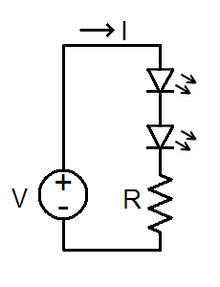
To build an electronic circuit, use a circuit diagram as your guide for positioning the various components on the breadboard and connecting them together.
This simple circuit has a resistor and a light-emitting diode (LED) connected to a 9 V battery. First connect the resistor, making sure the pins are on different rows. Then connect the LED, ensuring that its negative pin is connected to the same row as the upper pin of the resistor. As this is a very simple circuit, you can connect the battery directly to the component area.
Series or parallel?
Components of an electronic circuit are connected in either a series or in parallel. In a series circuit—made up of, for example, three resistors—a wire links the 9 V battery to the first resistor, from there to the second, then on to the third in turn before returning to the battery in a continuous loop. In a parallel circuit, each resistor is wired to the battery in a separate loop.


Multimeter
Often placed next to each component on a circuit diagram is a number. It gives that component's value. This is important, as only components of the correct value will allow the circuit to work. The value can be obtained from the spec sheet, or you can measure it yourself using a multimeter. This instrument measures four different things: the resistance (in ohms or Ω), the capacitance (in farads, F) of a capacitor, the voltage (in volts, V), and the current (in amperes, A).
Microchips
An integrated circuit (IC) is a complete electronic circuit made and shrunk down to fit on to a tiny "wafer" made from a material called silicon. It consists of many electronic components, all microscopic in size, hence its common name: microchip. What the circuit does—e.g. a radio transmitter or a microcontroller—depends on which components it contains and how they have been connected. (You can read more about microchips here and, for more advanced information, here.) They are useful to add to your circuit when you want it to carry more complicated tasks, such as making a light flash on and off.

Consultant: Mike Goldsmith
pics

Without in any way limiting Q-files Ltd’s exclusive rights under copyright, any use of this publication to “train” generative artificial intelligence (AI) technologies to generate text is expressly prohibited. Q-files Ltd reserves all rights to license use of this work for generative AI training and development of machine learning language models.