
Electronics

CITE
We have made every effort to follow citation style rules, but there may be some minor differences. If in doubt, please refer to the appropriate citation style manual.
Digital electronics. (2026). In Q-files Encyclopedia, Technology, Electronics. Retrieved from
https://www.q-files.com/technology/electronics/digital-electronics
"Digital electronics." Technology, Electronics, Q-files Encyclopedia, 13 Mar. 2026.
https://www.q-files.com/technology/electronics/digital-electronics.
Accessed 13 Sep. 2026.
Digital electronics 2026. Technology, Electronics. Retrieved 13 September 2026, from
https://www.q-files.com/technology/electronics/digital-electronics
Technology, Electronics, s.v. "Digital electronics," accessed September 13, 2026.
https://www.q-files.com/technology/electronics/digital-electronics


Digital electronics
In many electronic circuits, such as those in radios, the electric current can be of any strength. These circuits are called analogue circuits. In digital circuits, the current can have only two strengths: on and off. Digital circuits are used in a range of devices, including computers, cameras, CD and DVD players and smartphones, in which the flow of electricity is controlled to represent information.


Binary number system
Numbers are represented in digital circuits using the binary number system. This uses only the digits 0 and 1 and so can easily be represented in electronic circuits by turning currents on or off. In the decimal system (numbers we use in everyday life: 1, 2, 3, etc.), the digits of a number represent ones, tens, hundreds and so on. In the binary system, the digits 0 and 1 represent ones, twos, fours, eights and so on. In digital circuits, each 0 or 1 is called a bit. A four-bit binary “word” can represent decimal numbers up to 15 (one 8, one 4, one 2 and one 1). The binary “word” 1101, for example, represents the number 13 (one 8, one 4, no 2s and one 1). So 13 is represented by the four-bit “word” 1101, its digital code. A sequence of eight bits, the number needed to represent a number or letter on a computer, is called a byte.
Almost any sort of information (from simple letters to complex moving images) can be converted into a series of numbers, represented by the digits 0 and 1. This means that this information can be represented in digital electronic circuits by controlling the flow of electricity (0 is for “off” and 1 is for “on”) through it. Computers rely on this fact to store numbers, words, pictures and sounds. They use circuits called logic circuits to process and manipulate the information.
Digitization
Many types of analogue information must to be turned into digital form before they can be handled by digital circuits. This process is called digitization. For example, in a microphone, a sound, which is created by waves of air pressure, is turned into a changing electric current, called an analogue signal, that represents the changes in pressure. This is turned into a digital signal by an electronic circuit called an analogue-to-digital converter. It repeatedly measures the analogue signal, turning it into a continuous stream of binary numbers.
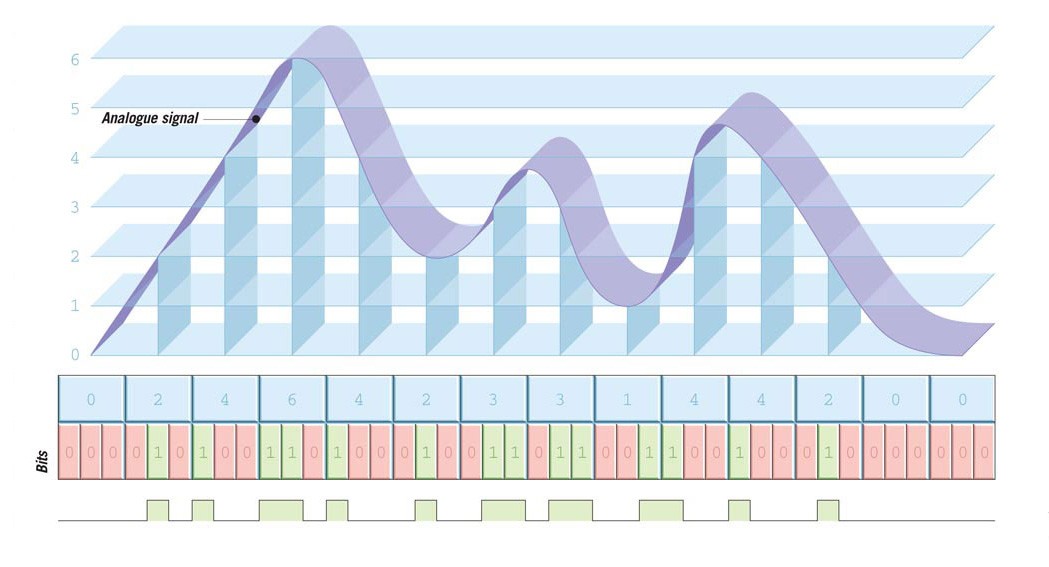
In telephone systems, the sound of your voice is digitized, normally at the telephone exchange, before it travels across the telephone network. Before it arrives at the telephone of the person you are talking to, it is turned back to an analogue signal (which is needed to work the speaker) by a digital-to-analogue converter. The same thing happens in a CD player, because sound is recorded in digital form on a CD.
Pixels
Anything that appears on a computer’s monitor is called computer graphics. These can be as simple as plain white text on a black screen, or as complicated as animated three-dimensional images. Whatever the graphics are, they are made up of small coloured squares called pixels (short for picture elements) in a grid pattern. The concentration of pixels in a picture is called resolution. High-resolution graphics can be viewed on a large screen without the pixels being visible. Graphics can have a different range of colours, too. In eight-bit graphics, each pixel is represented by eight bits, and so can be any one of 256 colours.


Storing pixels
on a computer
Each pixel on a computer monitor screen has a unique position, colour and brightness. This information exists as binary codes in the computer. This pixel is 4 units across, 6 down, so its position code is 4, 6. Its colour, green, is coded 5 and its brightness is 3 on a scale 1 to 10. So its code is 4653.
The pixel code is stored as a binary number, which, inside the computer, exists as electrical signals. 1 means an electrical pulse, 0 means no electrical pulse.
Every pixel that makes up a computer graphic—one of many hundreds of thousands—has its own code. The tiny portion of the image of Tower Bridge, London, shown here has 100 alone. The higher the definition of the picture, the more pixels it has and the more binary digits required to represent them.
Storage on disc
Information can be recorded in digital form on a compact disc (CD). Sounds, images, video or text are turned into a series of digital codes. These are stored on the disc as a series of pits and flats.
The disc is “read” by a laser beam. A series of mirrors and lenses focus a laser beam on to the underside of a CD. The reflected beam “reads” the various pits and flats that represent the coded information. The machine turns these into electrical signals.

A DVD (which stands for either "digital video disc" or "digital versatile disc") is a digital optical disc storage format that has higher storage capacity than a CD, and is commonly used for storing feature films. A Blu-ray disc uses a blue laser to read the disc, which, because it has a shorter wavelength than the red lasers used to read CDs or DVDs, allows information to be stored at a greater density. Films at a higher definition can be recorded on to Blu-ray discs.
Consultant: Chris Oxlade
pics
Without in any way limiting Q-files Ltd’s exclusive rights under copyright, any use of this publication to “train” generative artificial intelligence (AI) technologies to generate text is expressly prohibited. Q-files Ltd reserves all rights to license use of this work for generative AI training and development of machine learning language models.